Connect the scales together.
Each scale plugs into the next with a short USB-C link along the base. One cable run powers a whole shelf and carries every count back — no wiring per bin.
A scale under each bin counts what is inside and reports stock levels to your screen. No counting, no scanning, no stocktake.
Every bin reports how many parts are inside. The count updates as parts are taken and returned — no manual input needed.
Set a minimum for each bin. When stock drops below it, the bin is flagged and the people who order parts know before the line stops.
The count for every bin is always current, so there is nothing to reconcile. The quarterly count that takes two people off the floor goes away.
Bin counts push straight to your inventory system. Stock records stay accurate without anyone re-keying numbers from a clipboard.
Each scale plugs into the next with a short USB-C link along the base. One cable run powers a whole shelf and carries every count back — no wiring per bin.
Run one cable from the end of the chain to the Portal. It powers the scales and collects the count from each bin. One Portal handles up to 127 scales.
Plug the Portal into your network to see stock from any device, or connect a Display to read the bins right at the rack. Use either, or both.
Every bin shows its quantity on hand in one screen. Check what is running low, reorder before it stops the line, and skip the stocktake.
Same scales, same app, same connection. Add bins as you go — there is nothing to reconfigure and no software upgrade when you grow.
A cloud portal you open in a browser — phone, tablet or desktop. See what is in stock, what is running low, and what needs reordering. Connects straight to your ERP so stock records stay accurate without re-keying.
Tell us the parts you hold and we will put together a system that fits your store.
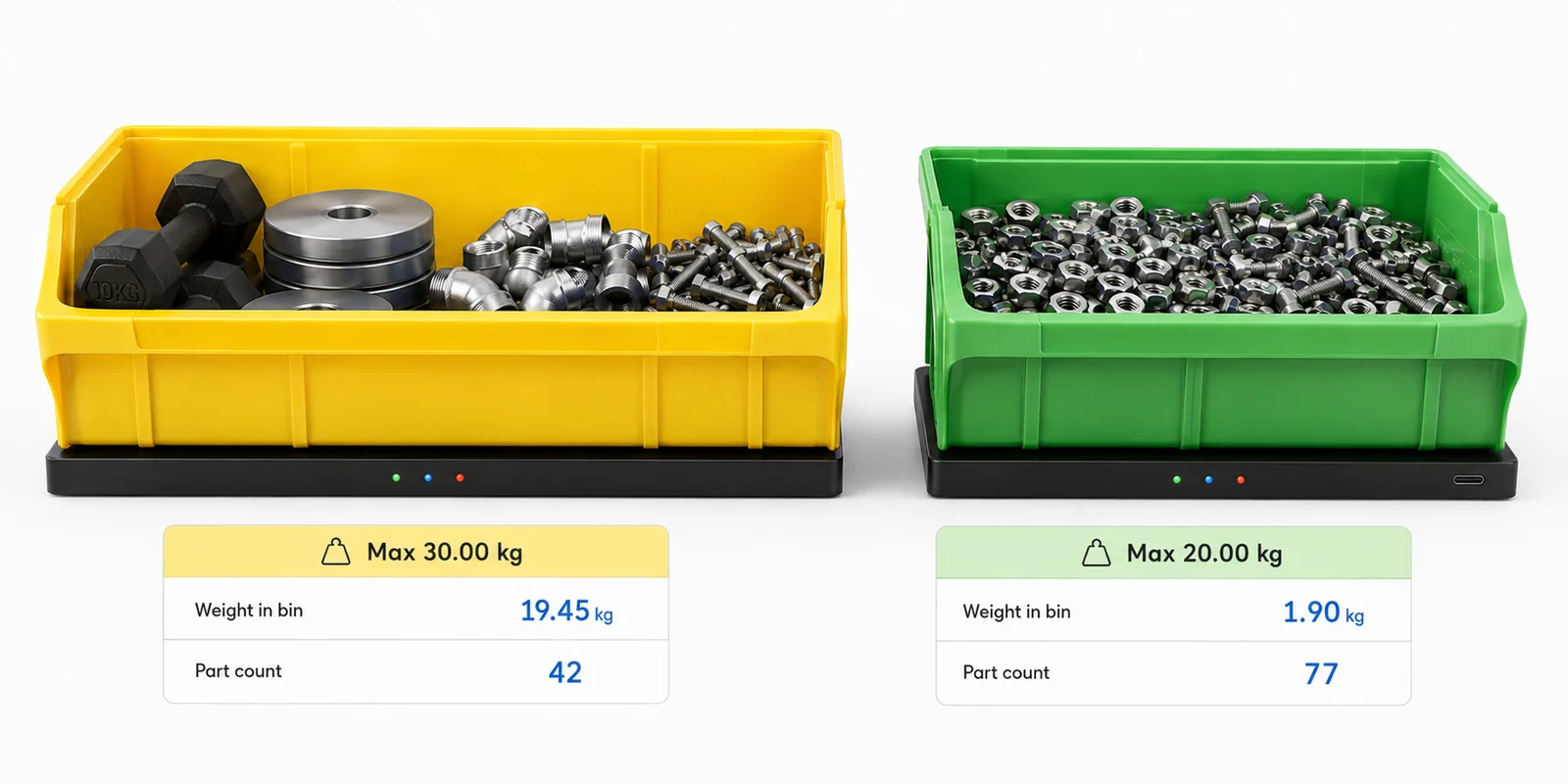
A slim scale slides under any standard storage bin. It counts the parts inside by weight and reports the number to the app — without changing your racking, your bins, or the way the line picks.
Parts go in and out the same way they always have. The scale reads the total weight continuously and turns it into a part count — one scale per bin, as many bins as the store needs.
Set the weight of a single part once. The scale reports how many are inside — from two heavy castings to five hundred washers. Each unit reads independently and reports through a single connection.
Choose the footprint to match the bin and the capacity to match the parts, from light fasteners to heavy components. Both size and capacity are built to order.
Select the scales and accessories you need and we will build a quote around your store.
Platforms are specified by footprint and capacity. Pick the size that matches the bin and the capacity that covers the parts inside — every combination below is a standard build, and anything beyond it is made to order.
| Footprint | 5 kg | 10 kg | 20 kg | 30 kg | 50 kg |
|---|---|---|---|---|---|
| Compact 210 × 150 mm | MBS-C05±5 g |
MBS-C10±10 g |
MBS-C20±20 g |
MBS-C30±30 g |
MBS-C50±50 g |
| Standard 300 × 200 mm | MBS-S05±5 g |
MBS-S10±10 g |
MBS-S20±20 g |
MBS-S30±30 g |
MBS-S50±50 g |
| Large 420 × 260 mm | MBS-L05±5 g |
MBS-L10±10 g |
MBS-L20±20 g |
MBS-L30±30 g |
MBS-L50±50 g |
| Wide 600 × 230 mm | MBS-W05±5 g |
MBS-W10±10 g |
MBS-W20±20 g |
MBS-W30±30 g |
MBS-W50±50 g |
| Custom Made to order | Custom footprint and capacity — contact us with your bin dimensions and part weights | ||||
Part-count accuracy depends on the weight of a single part relative to the platform resolution. Heavier parts count reliably on higher-capacity platforms; light parts are best matched to a 5 or 10 kg unit.
Every chain needs at least one Portal or one Display. Add a Portal for network and app reporting, a Display for a standalone read on the floor, or both.
Run the chain onto your network through the Portal, or connect a Display for a standalone read at the bench. Either way, one Portal serves the whole chain.
A cloud portal that turns scale readings into a live inventory system. Dashboard, alerts, trends, consignment tracking and ERP connection — all in a browser, nothing to install.
Total parts, number of containers, bins below minimum, offline scales, inventory value and changes today — all on one screen with recent activity.
Browse by part number, description or location. See on-hand quantity, total weight, unit weight, min/max levels, percentage full and status for every container.
Below-minimum, empty, offline, rapid decrease, unexpected weight change and container-removed alerts. Acknowledge each one so nothing gets missed.
Total inventory over time, daily consumption, most-used parts, slow-moving stock and inventory by location — all as charts you can filter by date range.
Chronological log of every replenishment, quantity change, scale disconnect and empty event. Filter by date, part, container, location or customer.
Organise containers by physical location. Each location shows its container count, total parts, low-stock items and last activity.
Filter by status, category or part number. See on-hand quantity, min and max levels, percentage full with a progress bar, and the last time each container was updated — all in one sortable table.
Current inventory, parts consumed, remaining stock, inventory value, last replenishment and full stock history — by customer or supplier.
Opening quantity, quantity used, closing quantity, unit price and total value. Export to PDF, CSV or direct to your accounting system.
Current inventory, low stock, empty containers, inventory by location or customer, consumption history, valuation, movement history and offline scales.
Continuous measurement means you can see exactly when stock changed, when containers were replenished, and what the stock level was at any point in time — not just the last time someone scanned a barcode.
Bin counts update the same stock records your purchasing already runs on. No double handling, no re-keying, no separate spreadsheet.
If your system is not on the list, the API covers it. Tell us what you run and we will confirm the connection before you order.
Part numbers, descriptions, unit weights, min/max levels and reorder points.
Assign parts to containers, set capacity and track by container ID.
Map each scale to a container and each container to a physical location.
User accounts, access levels, and notification rules for alerts and thresholds.
Tell us the parts you hold and we will show you the count in the app.
Tick the platforms and accessories you need, set quantities, and add your details. We will confirm sizing against your bins and respond with a quote within one business day.
We have received your request and will respond within one business day. Here is a summary of what was sent.
Last updated: July 2026
Maxi Bin Solutions ("we", "us", "our") is an Australian company that manufactures bin inventory monitoring hardware and operates the StockMonitor cloud portal. Our contact email is sales@maxibinsolutions.com.
When you use this website we may collect:
Information you provide — your name, company name, email address, phone number and any notes you include when requesting a quote.
Information collected automatically — pages you visit, links you click, your browser type, screen size, approximate location (country/region level) and referring URL. This data is collected through Google Analytics 4 and is used in aggregate to understand how people use the site. Google Analytics may set cookies on your device. You can opt out at tools.google.com/dlpage/gaoptout.
We use quote request data to respond to your enquiry and to prepare a proposal. We use analytics data to improve the website. We do not sell, rent or share your personal data with third parties except as necessary to operate this website (hosting via Vercel, DNS via Cloudflare, analytics via Google).
This site uses cookies set by Google Analytics to distinguish users and sessions. These are first-party cookies stored on your device. You can block cookies in your browser settings or use the Google Analytics opt-out extension linked above.
Quote request data is delivered to us by email. The website is hosted on Vercel with DNS and CDN through Cloudflare. Analytics data is stored by Google under their data processing terms. We do not store your personal data on servers we control beyond our email systems.
You can contact us at any time to request access to, correction of, or deletion of your personal data. If you are in Australia, the Australian Privacy Principles under the Privacy Act 1988 (Cth) apply. Contact sales@maxibinsolutions.com with any privacy requests.
We may update this policy from time to time. The "last updated" date at the top of this page will reflect the most recent revision.
Every bin on your production line reports how many parts are left. Low stock is flagged before the shift that needs it — so reorders happen on data, not on someone remembering to check.

A missing fastener or fitting halts the whole line. The cost of one stoppage dwarfs the cost of the parts — but nobody knew the bin was low because checking means walking and counting.
Parts are reordered when someone notices they are gone, not when stock drops to a level that gives lead time to replenish. Every late order is a risk to the schedule.
Cycle counts pull people off the floor. The spreadsheet is out of date the moment someone walks away. And the count itself is only as accurate as the person doing it.

USB-C links each scale to the next. One cable run powers and reads a whole shelf of bins — no wiring per bin, no changes to your racking.
Each bin on the line sits on a scale. The scale counts the parts inside by weight and reports the number to the app — continuously, without anyone touching it.
Set a minimum for each bin. When stock drops below it, the bin is flagged and the people who order parts are notified — hours or days before it would stop the line.
Bin counts push straight to your inventory system. Stock records stay accurate without anyone re-keying numbers. Purchase orders can trigger on actual consumption.
Tell us the parts you hold and we will put together a system that fits your store.
The storeroom manages itself. Counts are always current, low bins flag automatically, and the quarterly stocktake that pulls two people off the floor goes away.


Part counts, low-stock flags and consumption trends — visible from any device without walking the store.
A technician walks to the storeroom, finds the bin empty, and waits for an emergency order. The machine stays down. The job that was supposed to take an hour takes a day.
The quarterly count takes two people off the floor for a full day. By the time it is entered, it is already wrong. And next quarter, the same exercise starts again.
Parts are drawn from bins but not always recorded. The spreadsheet says 50 in stock. The bin says otherwise. Purchasing reorders too early or too late because the numbers are unreliable.
Every bin reports its own count. Technicians take what they need. The system tracks what was taken and when — no sign-out sheet, no barcode scan, no data entry.
The count for every bin is always current, so there is nothing to reconcile. The quarterly count that costs two person-days simply goes away.
Consumption trends show exactly how fast each part is used. Set minimum levels and reorder points based on what actually gets consumed, not on guesswork.
Tell us the parts you hold and we will size a system to your store.
See consumption at every customer site in real time. Invoice on actual usage. Replenish before the customer has to ask — and stop losing accounts to empty bins.


The Portal connects the customer's bins to your network. You see every bin from your desk — no visits to count.
Your reps visit customer sites to visually check bins and guess reorder quantities. Every visit costs time, fuel and a person who could be selling. And the count is still a guess.
Stock sits at customer sites with no reliable count of what has been consumed. Invoicing relies on memory or periodic reconciliation that is always late and often wrong.
Without real data, reps over-fill bins to avoid complaints — tying up your cash. Or they under-fill and the customer runs out, which risks the account.
Every bin at every customer site reports its count to your dashboard. You see what is running low from your desk — no visit needed.
The system records exactly what was consumed and when. Bill the customer on actual usage, not on estimates. Built-in consignment and billing reports export to PDF, CSV or your accounting system.
Low-stock alerts tell you when to send more. Consumption trends show the right quantity to send. The customer never runs out and never has to chase you.
Tell us how many sites and bins you manage and we will build a system around your VMI program.
Every bin at every site reports to one dashboard. No more flying someone in to count. No more emergency freight because a bin went empty unnoticed.


Stock levels at Site A, Site B and the central warehouse — visible from one login, updated continuously.
Remote sites hold thousands of parts across scattered storerooms. The only way to know what is actually there is to send someone to count — and that means a flight, a vehicle and a full day.
A missing bearing or seal means a machine is down. Emergency air freight for a part that costs a few dollars can run into thousands. The real cost was not knowing it was gone.
Without data, sites hold too much of everything to avoid running out. Capital is tied up in slow-moving stock that sits in a storeroom for years.
Every bin at every site reports to the same cloud portal. Check stock levels at Site A, Site B and the central warehouse from one login — no travel.
Consumption trends show which parts move at which sites. Pre-position stock based on data, not on guesswork. Reduce emergency freight and reduce the buffer.
IP54-rated, 0–50 °C operating range. The scales handle dust, vibration and temperature swings on a mine site or processing plant.
Tell us the sites and parts you manage and we will design a system that covers them all.
Consumables drawn from bins are tracked automatically. Tie usage to jobs or customers, invoice on actuals, and see exactly where margin is going.
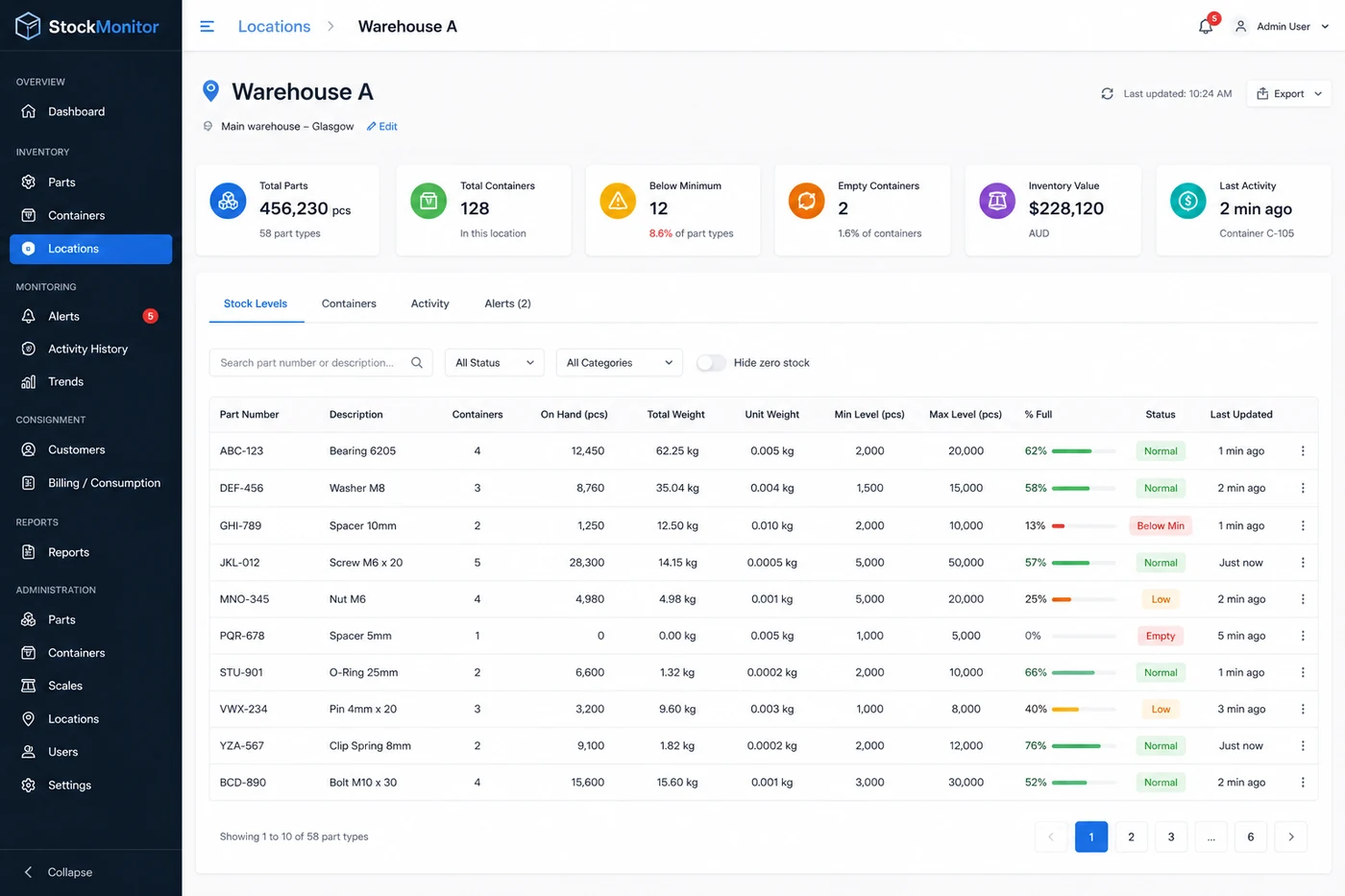
The app records every change. Billing reports show opening stock, consumption and closing stock — export to PDF, CSV or your accounting system.
Fasteners, fittings, adhesives, abrasives — they are drawn from bins but rarely recorded. Jobs are quoted with a consumables allowance, but actual usage is never measured.
If consumables are under-estimated in the quote, margin shrinks. If they are over-estimated, you are not competitive. Without data, it is a guess either way.
Someone notices a bin is empty and raises an order. By then the job that needed those parts is waiting. Rush orders cost more and disrupt the schedule.
Every bin records exactly how much was taken and when. The activity log and consumption reports show usage by part, by period and by location.
Billing reports show opening quantity, quantity used, closing quantity and value for any period. Export to PDF, CSV or directly to your accounting system.
Set minimums per bin. Low stock is flagged early. Consumption trends help set the right reorder points so parts are there when the job starts.
Tell us the consumables you hold and we will size a system around your bins.
You own the stock. It sits at your customer's site. The scales tell you what has been consumed, what needs replenishing, and what to invoice — without anyone counting or reporting.


See what every customer has consumed, what needs replenishing, and what to invoice — from one dashboard.
You own the parts but they sit in someone else's storeroom. You have no idea what has been used until someone tells you — and they often do not tell you until the bin is empty.
Billing relies on the customer reporting what they used, or on your rep counting what is left. Both methods are slow, inaccurate, and create disputes.
Consignment stock is capital on someone else's shelf. Without real data, you do not know the value sitting at each site, how fast it moves, or whether it is worth holding.
Every bin at the customer site reports its count to your dashboard. You know what was taken, when, and how many are left — without waiting for a report or a site visit.
The system records opening stock, quantity consumed and closing stock for any period. Generate billing reports by customer, by part, by site — and export to your accounting system.
Consumption trends and low-stock alerts tell you exactly when and how much to send. The customer never runs out, you never over-stock, and replenishment visits are planned — not reactive.
Tell us the customer sites you supply and we will design a system around your consignment program.